The offline-first money app for Android and iPhone. Income, expenses, budgets, goals, loans and dues — kept in a database on your phone, never on a server. No sign-up. No ads. Free forever.
No network accessOpen source · MIT18 stars on GitHub
76
XPENC ScoreGood habits
Network accessNone. Ever.
0servers
0trackers or ads
100%offline
₹0forever
Lives on your phoneA private SQLite database. No cloud copy exists.
Can't phone homeNo internet permission on Android, no network code on iPhone.
Numbers that don't lieTransfers never count as spending. Nothing is counted twice.
Every line is publicMIT-licensed. Audit it, build it, fork it.
Take the tour
Everything your money needs. Nothing it doesn't.
Real screens from the app, with sample data. Tap any phone to see it full size.
Dashboard
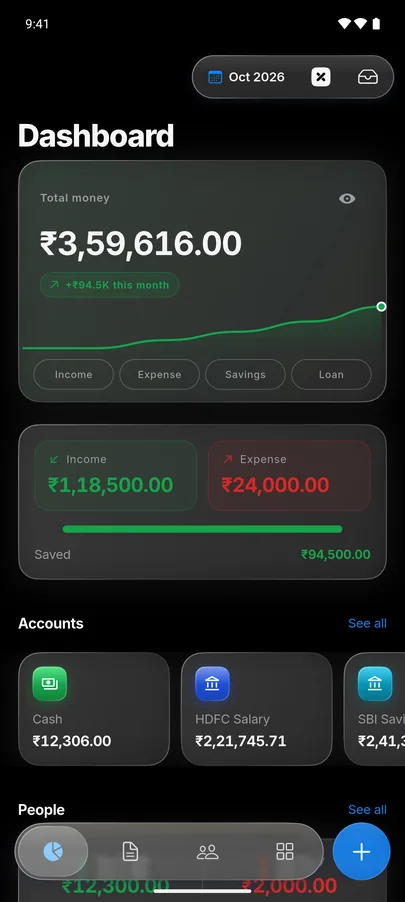
Your whole money picture, on one screen.
Open the app and you already know where you stand — what you have, what came in, what went out, and what's due next.
Total money is the real sum of your balances — debit cards are never counted twice.
This month's income, expense and what you saved, at a glance.
People who owe you, and bills and salary coming up this week.
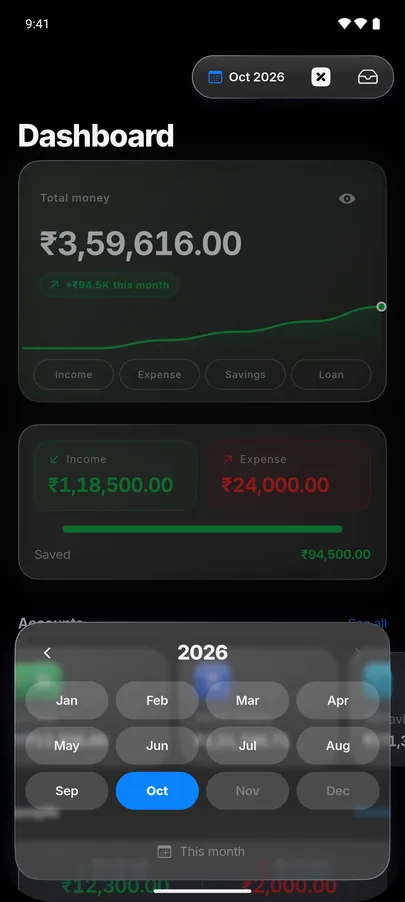
Pick a past month to see it exactly as it closed — and choose which widgets show, in your order.
Quick entry
Log a payment before the bill arrives.
A big numpad, your last account pre-selected, and colourful categories one tap away. Most entries take three taps.
Split one purchase across categories — or across the accounts that paid.
Tags, notes, receipt photos, a foreign-currency amount or your own emoji.
Or skip typing: share a bank SMS or a UPI screenshot into XPENC and it fills itself in, on-device.
Budgets
Budgets that speak up before it's too late.
Set a limit per category and watch it fill up as you spend. XPENC warns you at 80% and flags anything that goes over.
Live progress on every category, with a clear OVER badge when you cross the line.
Start your budget month on payday — any day from 1 to 28.
Optional Ready to Assign: give every rupee a job before you spend it.
Shopping119% · over
Coffee47% used
People & groups
Who owes whom — settled in one tap.
Lend, borrow and split trips without a spreadsheet. Money you lend isn't an expense, so it never pollutes your budgets.
Split a group expense equally, by percentage or by exact amounts.
Partial repayments and a running balance for every person.
Pay or request straight through UPI, PayPal, Venmo, Cash App or Revolut.
Share a person's statement or a group's split as a PDF or an image card.
Goals & loans
Save toward what matters. See what loans really cost.
Goals show exactly how far you've come. Loans show the interest you'll pay, month by month — and what paying a little extra would save.
Savings goals with progress and a countdown to your target date.
Loans with interest rate, tenure, an EMI schedule and an interest/principal split.
A prepayment simulator and auto-paid EMIs, set up the moment you add a loan.
Stats & XPENC Score
Know if you're actually doing well.
The XPENC Score rates your money habits from 0 to 100 using seven rules — and tells you the one thing to improve next.
Nine modules: cash flow, spending, income, net worth, loans, people, goals, budgets and recurring.
Spending by category and subcategory, top transactions and top payees.
Share any month as a PDF report — generated on your phone.
Accounts & calendar
Every account, every date, accounted for.
Cash, bank, credit card and wallets side by side — and a calendar that shows exactly which days money moved.
Credit cards track their statement and due dates, with a reminder before it's due.
Accounts in any currency; net worth converts to your home currency.
Reminders for EMIs and bills post nothing until you confirm them.
New · Liquid Glass
The iPhone look. On any phone.
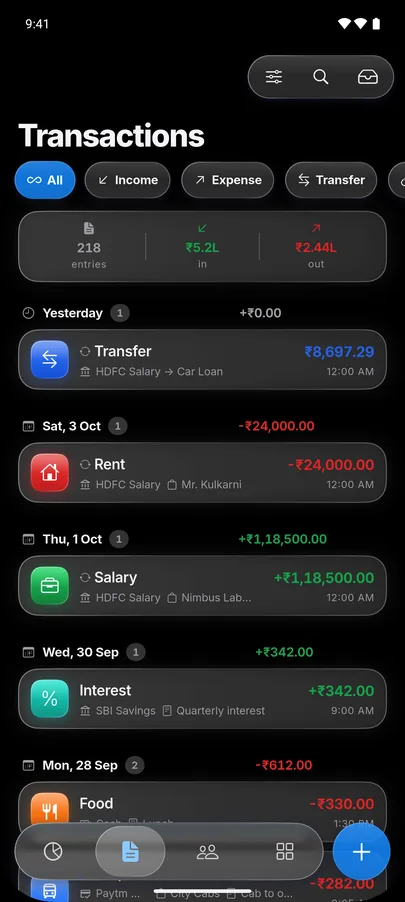
The Glass theme is built the way iOS builds it: frosted cards on true black, a floating glass tab bar, and sheets and pages that grow out of it. Prefer something quieter? Classic and Noir come in light or true-black dark.
Dashboard
Transactions
The tab bar becomes the month picker
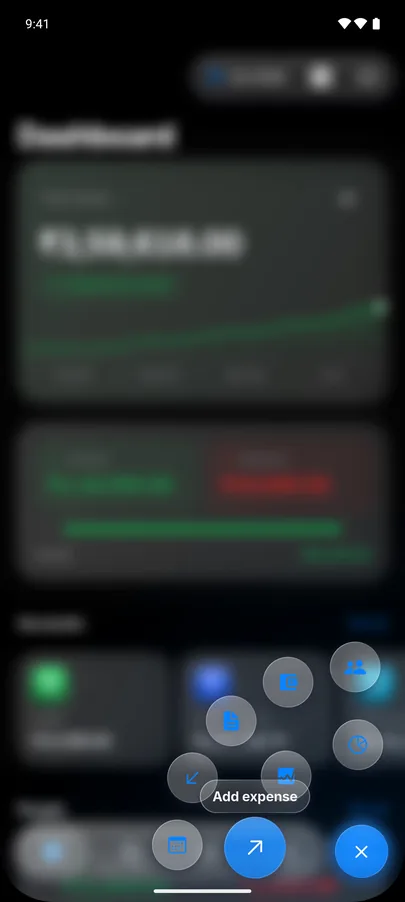
Hold the + button for quick actions
GlassClassicNoirTrue-black darkLight · Dark · System
Features
One rule everywhere: the numbers must not lie.
Net worth is the sum of your account balances. Transfers leave it unchanged, income raises it, expense lowers it. Everything else follows from that.
Share as a PDF or an image New
A transaction as a receipt, a person's statement with a running balance, a group's who-owes-whom — as a clean PDF or a styled card, made on your phone.
Hide from screenshots New
Mark a transaction private and it shows as frosted glass everywhere it's listed, so a screenshot catches only the frost. Hold it to peek.
Your dashboard, your way New
Drag widgets into order, add Cash flow, Goals, Loans, Groups or Shopping lists, and pick any past month to see it exactly as it closed.
SMS & screenshot capture
On Android, share a bank SMS or a Paytm, Google Pay or PhonePe screenshot into XPENC. It's parsed on-device into your Review Inbox — no READ_SMS permission.
Ready to Assign
Zero-based budgeting: every account pools into one figure, and you fund each category before you spend — funded, underfunded or overspent at a glance.
Multi-currency
Accounts in any currency, statements in that currency, net worth in yours. Pick your country on first run and amounts look right from day one.
Auto rules
Daily to yearly schedules, promo prices for the first few months, "Pay now", and rules that fund a goal or pay an EMI by themselves.
App lock
PIN, master password and/or an authenticator app, fingerprint or face unlock, Scrambled numpads and a 10-word recovery phrase.
Backups that survive
On Android, automatic backups to Downloads that outlive an uninstall. On iPhone, share one to Files or iCloud Drive. Either restores on the other.
Import from CSV or Excel
Bank statement CSVs are auto-detected in the app. Kept your money in Excel? SheetConv converts it in your browser.
Credit card due dates
Set the statement close day and payment due day to see the current billing cycle, days left and a reminder before it's due.
Calculators
FD & RD, loan EMI, SIP & lumpsum, PPF, GST and income tax for India, the US, the UK and Germany — right inside the app (Beta).
Templates & your own emoji New
Reusable transaction templates, duplicate with a long-press, saved category sets — and 76 searchable icons or any emoji you like as a category's icon.
Quick Add & widgets
On Android, post an expense straight from a notification, add a This Month widget, and lock-screen shortcuts for the things you do most.
Make it yours
Glass, Classic or Noir in light, dark or system mode. Pick your bottom-nav tabs, hide amounts on demand, and set text size, boldness and font.
Compare
How it's different.
Most "free" finance apps make money from your data. XPENC has nowhere to send it — there's no server on the other end.
XPENC compared with most free finance apps
Category
XPENC
Most free finance apps
Works with no internet
Always
Usually needs a connection
Account / sign-up
None, ever
Email or phone required
Ads
Never
Common on the free tier
Analytics & trackers
None
Standard, often bundled
Source code
100% open, MIT
Closed
Reading bank SMS
On-device via Share, no READ_SMS
Often needs background SMS access
Where your data lives
Only on your phone
Synced to the vendor's servers
Price
Free, forever
Free tier + paid upgrade
Privacy
The app can't leak your data. It has no internet.
Release builds for Android don't request the INTERNET permission, so sending your data anywhere is technically impossible — not a promise, a property of the app. On iPhone, where no app can give that permission up, XPENC still never makes a network request. The code is open, so you can check it yourself.
Read SMSBackground access to your messagesNever asked
Analytics & ads SDKsTracking, profiling, ad IDsNone bundled
CameraReceipt photos, only if you wantOptional
ContactsPick people for dues, on-device onlyOptional
NotificationsBudget alerts and remindersOptional
SheetConv
Tracking money in Excel? Bring it with you.
Upload your Excel, Google Sheets or CSV tracker, match the columns, and download a file XPENC imports in one tap. It even handles sheets with one column per category. Everything runs in your browser — nothing is uploaded.
On Android, Google Play is the easiest way to install and get automatic updates — or skip Google with F-Droid or a direct APK. On iPhone, install it with SideStore or AltStore. Every build comes from the same open-source code.
Scan to open the download page on your phone, open XPENC on Google Play, or grab any build — including other CPU types and the iPhone app — from GitHub Releases. Android 7.0 or later; iPhone on iOS 15 or later — how to install on iPhone.
Every GitHub release ships SHA256SUMS.txt — verify your download. The release process is fully automated from a version tag.
What's new
Actively developed, in the open.
Every release ships with a public changelog — no vague "various improvements."
v1.6.4Latest
10 Oct 2026 · first on iPhone
XPENC on iPhone, the Liquid Glass theme, sharing as a PDF or an image, hiding transactions from screenshots, a customizable dashboard with past months, a country step on first run and your own emoji as category icons.
v1.6.330 Sep 2026
People as payees, Calculators (Beta) for FD, RD, EMI, SIP, PPF, GST and income tax, one-tap balance corrections, an Account Reports hub, "who owes whom" for groups and a quick-actions ring on the + button.
v1.6.226 Sep 2026 · first on Google Play
The XPENC Score, a nine-module Stats hub, loan insights with a prepayment simulator and instant auto-pay EMIs, people from contacts and Settings › Permissions.
v1.6.124 Sep 2026
Rate-based loans with tenure, total interest and an interest/principal split on every payment. Yearly Auto rules, minimum balance warnings and a built-in Guide.
Include your phone's Android or iOS version, XPENC version (Settings → About) and the exact steps. A screenshot helps more than a paragraph.
Your data stays yours
Never send me your backup file unless I ask — and even then, it's your call. I can debug from steps alone.
Response time
One maintainer, so usually a day or two. GitHub gets checked most often.
FAQ
Common questions.
The short answers. The privacy policy has the long ones.
Is XPENC free to use?
Yes. XPENC is free and open source under the MIT license — no ads, no in-app purchases, no subscription, ever.
Does XPENC need an internet connection?
No. Release builds for Android don't request the INTERNET permission, so the app is technically incapable of sending your data anywhere. On iPhone, where apps can't give that permission up, XPENC still never makes a network request. (This website loads a font and a version badge online; the app never does.)
Is my financial data safe and private?
Your accounts, transactions, budgets and dues live in a private SQLite database on your phone only. There's no server, no user accounts, no analytics and no trackers — and since the app is open source, every claim here can be verified by reading the code.
Can I import transactions from my bank?
Yes, three ways: share a bank SMS or a UPI payment screenshot (Paytm, Google Pay, PhonePe) into XPENC from the Share sheet, or import a CSV bank statement from Download Data. All three are read and parsed entirely on-device.
Can I move my Excel or Google Sheets tracker into XPENC?
Yes. SheetConv converts an Excel, Google Sheets or CSV money tracker into a file XPENC imports from More › Backup & Restore › Import from file. It runs entirely in your browser — nothing is uploaded.
Does XPENC do budgeting and dues/loan tracking?
Yes — per-category budgets with live progress and overspend alerts, an optional Ready to Assign layer for zero-based budgeting, loans with interest, EMI schedules and a prepayment simulator, and separate dues tracking for money you lend or borrow, kept out of your budgets.
Where can I download XPENC?
On Android, Google Play is the easiest — it installs and updates automatically. F-Droid builds straight from source, and there's also a direct APK from GitHub Releases. On iPhone, use SideStore or AltStore, or the .ipa from GitHub Releases. All of them are free and built from the same code.
Is XPENC available on iPhone?
Yes. XPENC for iPhone (iOS 15 or later) installs with SideStore or AltStore: add the source xpenc.in/ios/source.json and new versions arrive there. Or sideload the .ipa from GitHub Releases with your own Apple ID. It isn't on the App Store. A backup made on Android restores on iPhone, and the other way round. How to install.
Open source
Read every line.
XPENC is MIT-licensed. The highest-impact contribution is an SMS template for your bank — config and regex, no app internals needed.